3D Printed Christmas Gifts and Ornaments You Can Personalize
By Moopky ·
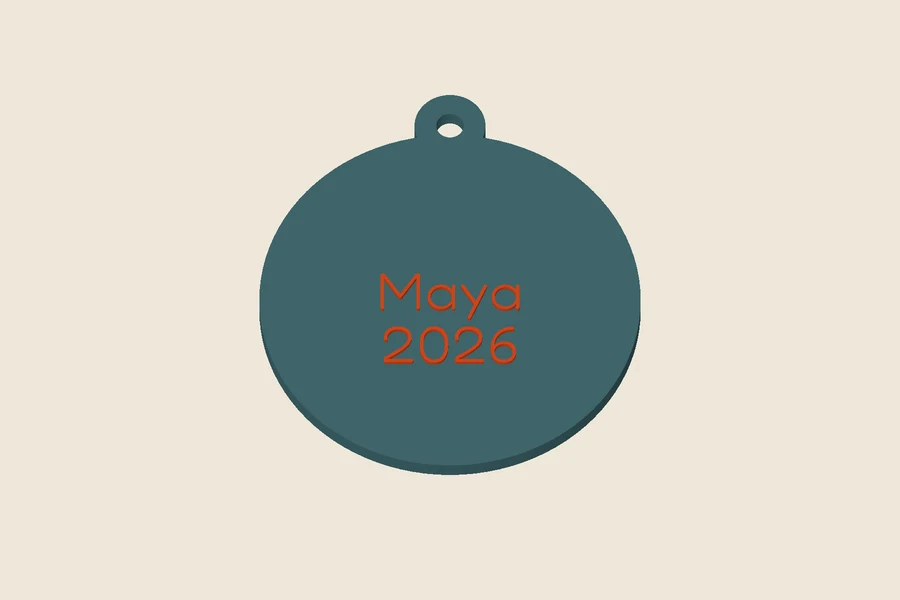
Free STL downloads, no account needed. Unlimited single-model downloads for personal use are offered today; 3MF, full batch downloads and commercial licences are not available. Current download options.
A personalized Christmas print works best when it records something specific: a name, a year, a shared place or a small achievement. You do not need to fill every surface with decoration. A readable message and a dependable physical object matter more than a complicated screen preview. This guide starts with the ornament workshop and then considers a few other gifts you can personalize. All images are renders of our generated models. We are not claiming physical print tests, measured durability or a validated printer profile.
Choose a shape before writing the list
Open the Christmas ornament maker and compare the six outlines: bauble, star, tree, bell, snowflake-edged round and heart. A bauble gives a broad central space for a name. A star has narrower points, and a tree brings detail around its perimeter before you add anything else. Select the outline that suits the message, rather than choosing a long message and expecting every shape to hold it equally well.
The starting body is about 70 mm with a 3.5 mm thickness. The hanging loop extends above it, so total height exceeds the nominal body size. Check the exported dimensions and compare them with the branch, ribbon or display location you intend to use. A small ornament on a screen can still be too large for a delicate branch. The preview does not know how much weight the real branch can hold.
Add the name and a meaningful second line
Use the main text for a short name and the optional second line for a year or brief phrase. Review spelling carefully, especially when preparing several gifts. More letters can mean smaller strokes, not simply a larger ornament. If the text is clipped by a star point or a heart edge, move it inward, reduce its scale or shorten the wording. Check the face at roughly actual size before deciding that it is readable.
Raised and engraved lettering create different physical surfaces. Raised words can suit a filament change at a chosen layer. Engraving cuts into the ornament and may be easier to keep visually quiet, but narrow recesses can close in a print. Neither option is automatically better for every nozzle or font. Inspect the sliced layers and try one sample of the exact text style you plan to repeat.
Let a few details carry the design
Start with one motif or a sparse pattern. Dots can leave space around a name; a large star can become the main feature. The shared decoration controls also accept a clean filled SVG. Use artwork you have permission to reproduce and remove unnecessary tiny islands or narrow gaps. The SVG converter and SVG troubleshooting guide are useful when preparing a simpler source shape.
The snowflake-edged round already has many perimeter changes, so it may need less surface decoration than a plain bauble. Fine tips deserve a close layer inspection. A smooth digital render can hide the fact that a slicer leaves only a tiny path at a point. Enlarge, simplify or change the outline if those paths are too fragile for your intended handling. Do not rely on a colour palette to communicate shape that the printer cannot reproduce.
Inspect the loop as a separate decision
The ornament includes a top opening with material around it and a connection into the body. It is designed as a hanging detail, but software geometry is not a physical strength test. Check the loop’s sliced perimeter, then inspect the printed surface for cracks or layer separation. Try the intended ribbon or cord gently before hanging the ornament. The download does not include ribbon, hooks or an assessed suspension system.
Avoid scaling the whole file casually. It changes the hole, surrounding material, text height and body thickness at the same time. If you need a smaller ornament, adjust its design size and inspect the rebuilt loop and lettering. Keep decorative objects away from heat and consider small-part hazards in the intended setting. A festive shape does not make the finished object a toy or a certified child-safe accessory.
Plan a modest two-colour experiment
STL contains geometry rather than assigned filament colours. For raised lettering, locate the first layer that prints the words above the body in your slicer. Use a filament-change workflow supported by your printer and check the resulting operation. Do not assume that dividing a model height by a nominal layer height identifies the exact transition, because first layers and variable-layer profiles can differ.
For a common 0.4 mm nozzle, a 0.2 mm layer height and three walls are starting settings to inspect for a flat ornament. Use your own printer and material requirements and review any brim around pointed shapes. Print one complete trial before starting a group. The engine keeps names for separate raised parts, but separate-part 3MF export is unavailable while billing is off; today’s free download is the combined STL.
Add gifts that have another job
A picture frame can hold a photo from the year being celebrated. Measure the photo and plan its backing or display support before decorating the border. A name plate can mark a personal shelf or workspace after the holiday. Keep its size appropriate to that location. These objects have different fit requirements from ornaments, so do not copy the ornament’s thickness and printing orientation without checking the generated geometry.
A letter shell can be a decorative initial, but it is not a complete lamp. The download includes no electrical components, wiring or assessed lighting assembly. An optional diffuser is a loose piece that needs a fit check and attachment decision. If you are working to a holiday deadline, a non-illuminated decorative letter avoids making an unplanned lighting project part of the gift. Do not treat illustrative preview lighting as a promised physical result.
Leave room for a correction
Prepare a small list with names, chosen shapes and the year, then build one representative ornament. Compare the shortest and longest names before repeating the design. A longer name may need a different scale or simpler font. Keep the successful settings and your slicer notes together. My makes stores settings on the current device, so maintain a separate record if losing that browser state would interrupt the project.
Today’s free workshop provides single-model STL downloads for personal projects without an account while billing is off. The batch tool previews three rows, and full batch downloads and commercial licences are unavailable in that state. Plan time to inspect each personal gift and its actual fit. Moopky supplies the digital files; you provide the printing, finishing and final judgement before a small model becomes someone’s Christmas keepsake.